LDAP Restarts
Introduction
LDAP is hosted as a single-task application on AWS ECS Fargate. Unlike applications that run multiple tasks for high availability, LDAP is a single-writer application and must run with only one active task. Running multiple LDAP tasks concurrently can result in data corruption and service instability.
AWS periodically performs routine maintenance on ECS Fargate tasks, including task retirement and replacement. Because Fargate is a fully managed service, these maintenance activities are controlled by AWS and can cause the LDAP task to be restarted or replaced without a schedule that is directly controlled by the application team. For LDAP, this presents an operational risk because the service requires additional steps following a restart.
LDAP also requires cache warming after a restart. When the server starts with an empty or cold cache, a sudden increase in authentication, TLS, or directory queries can place a significant load on the server and may cause it to become unstable or crash. The cache-warming process runs a controlled set of queries against LDAP before normal user traffic is allowed to place the full expected load on the service.
This runbook describes the controlled process for restarting the LDAP task and subsequently warming the LDAP cache. The objective is to ensure that restarts are performed in a predictable manner and that LDAP is fully operational and ready to handle normal user traffic following the restart.
Note: There is an automated process with the intention to replace this manual activity
AWS Maintenance Notification
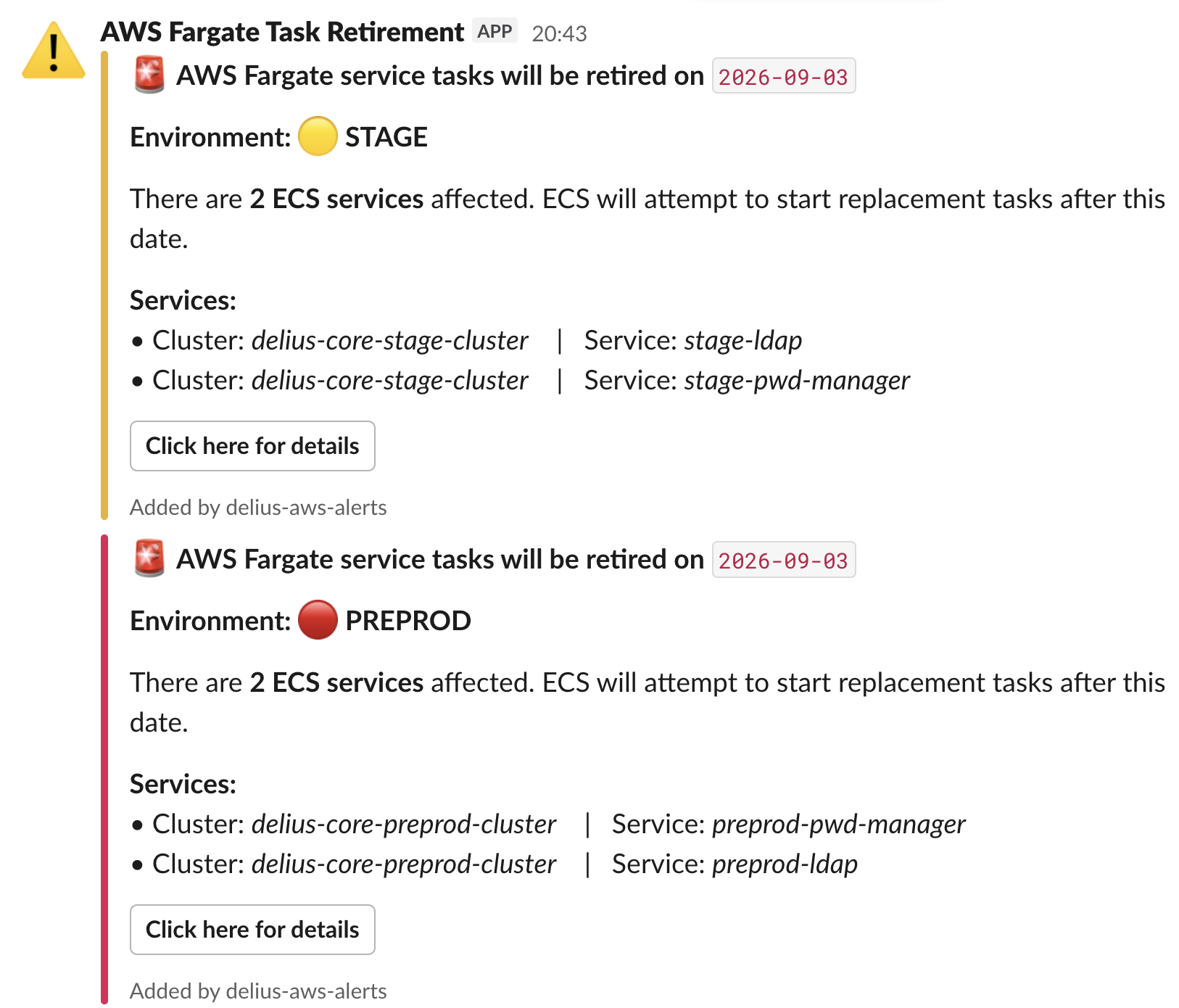
Notifications for scheduled AWS maintenance i.e. ECS Fargate task patching and retirement, are sent to the #probation-migration-team Slack channel.
These notifications are usually sent around one week before the scheduled update and identify the affected environments and ECS services.
The LDAP restart and cache-warming procedure must be completed before the scheduled AWS maintenance begins.
Mention the restarts in the NDST stand up prior to doing them, informing them of when they will take place and what environments, so that the relevant notifications and banners can be updated.
AWS Environment Reference
LDAP is deployed across the following AWS environments:
| Environment | AWS Account | ECS Cluster |
|---|---|---|
| Stage/PreProd | ——–1417 | delius-core-stage-cluster, delius-core-preprod-cluster |
| Production | ——–5573 | delius-core-prod-cluster |
Prerequisites
- Disconnect from the VPN for faster response times
- Login in to AWS in the console via
aws sso login --profile delius-core-[env]- Ensure the AWS accounts are added to your
configfile. E.g.
- Ensure the AWS accounts are added to your
[profile delius-core-preproduction]
sso_start_url = https://moj.awsapps.com/start
sso_region = eu-west-2
sso_account_id = #######1417
sso_role_name = modernisation-platform-developer
region = eu-west-2
- Ensure you have
ecsgoinstalled. If not, run the following commands:brew tap tedsmitt/ecsgoOfficial GitHub repo for ecsgobrew install ecsgo- You may need to run the command to trust first
1. Check the AWS Health Dashboard
Before performing the LDAP restart, check the AWS Health Dashboard for any scheduled ECS task maintenance or retirement events. These will also come through as Slack notifications, at least a week in advance.
- Sign in to the AWS console
- Navigate to AWS Health Dashboard
- Open the Scheduled changes section
- Look for an event relating to ECS task patching or task retirement
- Select the relevant event to view the event details
The event details provide information about:
- The reason for the scheduled change
- The expected maintenance or retirement activity
- Any actions that need to be taken
- The affected resources, which identify the ECS resources impacted by the scheduled change

Identify the LDAP Resource
In the Affected resources section:
- Loacte the LDAP resource
- Select the LDAP resource
- This will take you to the relevant ECS cluster
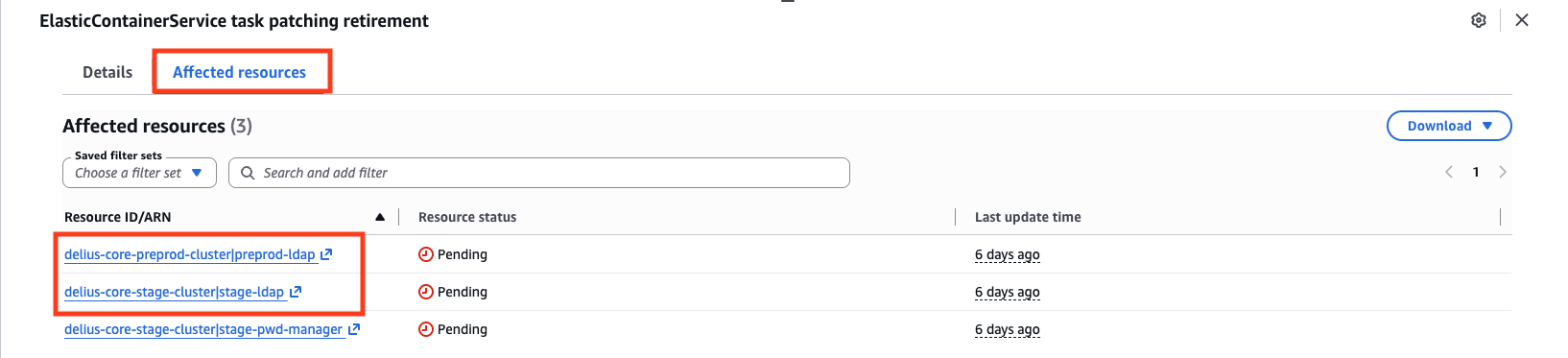
From the clusters, identify the appropriate environment, depending on which one you are working on:
delius-core-stage-clusterdelius-core-preprod-clusterdelius-core-prod-cluster
2. Open the LDAP ECS Service
Once you are in the correct ECS cluster:
- Select Services
- Locate the LDAP service for the relevant environment:
stage-ldappreprod-ldapprod-ldap- Select the LDAP service by clicking the checkbox
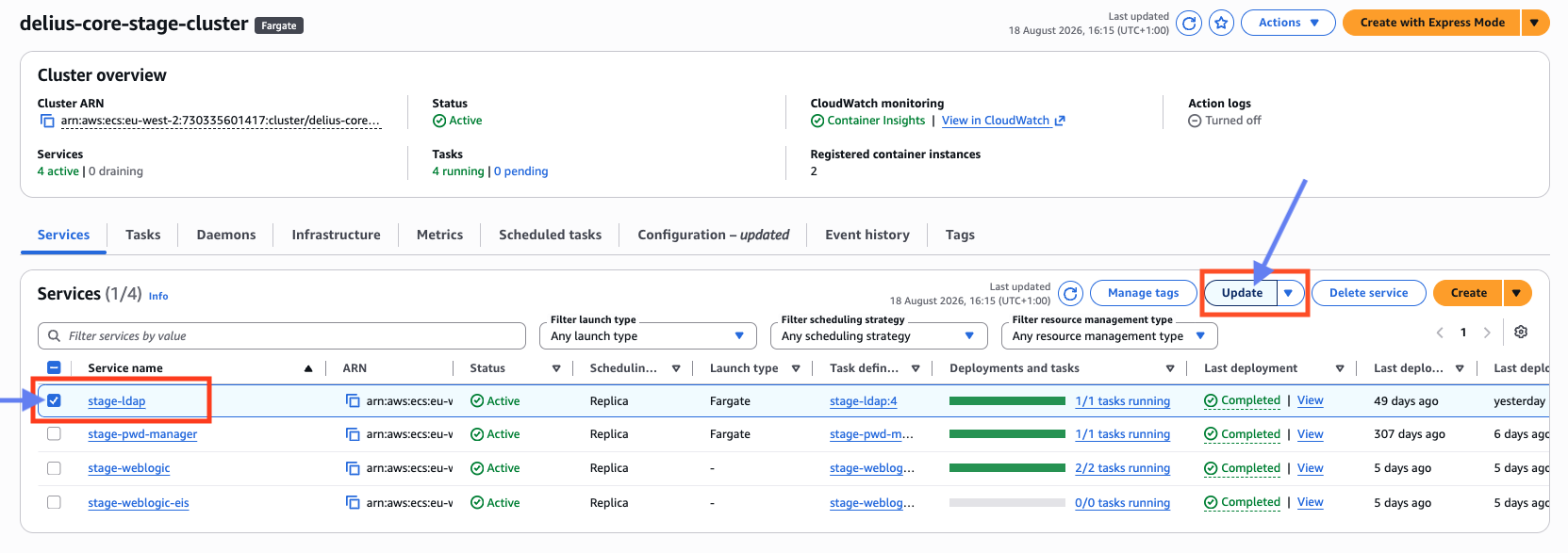
3. Stop the LDAP Task
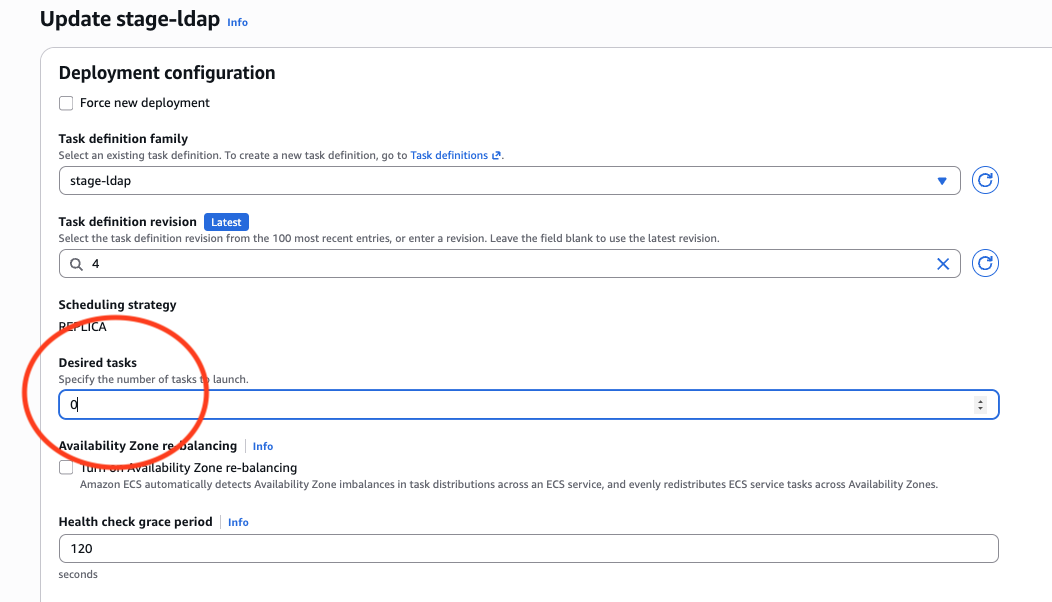
The LDAP service normally has a desired task count of 1
To stop the LDAP task:
- From the previous steps, you should have the LDAP service selected
- Click on the Update button
- Locate Desired tasks
- Change the desired task count from
1to0 - Select Update at the bottom of the page to apply the change
This will stop the LDAP ECS task
Wait for the Task to Stop
After updating the service:
- Monitor the LDAP tasks status in the Tasks tab
- Wait for the existing task to transition through its deactivating > stopping state
- Confirm that the task has fully stopped before continuing
The shutdown normally takes approximately 5 minutes, but the actual time may vary
Important: Do not restart the LDAP task until the previous task has completely stopped

4. Restart the LDAP Task
Once the previous LDAP task has completely stopped:
- Return to the ECS Services view
- Select the LDAP service again for the relevant environment by clicking the checkbox
- Select Update
- Change Desired tasks from
0back to1 - Select Update at the bottom of the page
This will cause ECS to launch a new LDAP task
Confirm the New Task Is Running
Monitor the LDAP service until the new task has started successfully:
- Go to the Tasks tab
- Check the task is running

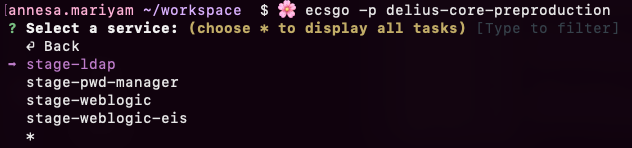
5. Connect to the LDAP Container
Once the new LDAP task is running, connect to the container from the terminal to perform the cache-warming procedure
Connect to the Correct ECS Environment
In your terminal, follow the steps below:
$ ecsgo -p delius-core-[env]



6. Cache-Warming Process
After connecting to the newly started LDAP container, perform the LDAP cache-warming procedure
The cache-warming commands are maintained on the LDAP - Data migration and cutover from legacy environment to MP confluence page
Important: Cache warming is a required part of the LDAP restart procedure. Do not consider the restart is complete until the cache-warming process has successfully completed
7. Verify LDAP is Operational
After cache warming has completed, verify that the LDAP service is operating normally
Confirm that:
- The ECS service has 1 desired task
- The LDAP task is running
- The task is healthy
- Cache warming completed successfully
- There are no unexpected errors or task restarts